
Fast & Ferrous
Fast & Ferrous is an interactive real-time strategy game in which team strategies command a fleet of robots on a rectangular field, gather crystals, build new robots, and fight opposing teams by firing on them.
The competition runs throughout the contest and consists of games.
Each game is specified by a GameConfig, which you can obtain through a request to the game server.
A game lasts game_duration_ticks ticks, where ticks happen roughly every 0.5 seconds (see tick_interval). Games are not run back to back: there are pauses between them during which teams may join the upcoming game.
Each team implements its strategy in any programming language, then runs and maintains it on its own. Communication between a strategy and the game server happens over the gRPC (recommended, download the .proto files) or HTTP protocol.
A strategy connects to the server, subscribes to the game-state stream via the Listen() method, and receives a fresh GameState every tick.
To take part in a game, a strategy calls the EnterGame() method between games. Calling EnterGame() registers your team for the next game that has not started yet; you cannot join a game that is already running. If a game is already running, the call is rejected and your team must call EnterGame() again during the next pause between games. Repeated EnterGame() calls are safe: for a team that is already waiting, they are harmless and keep the team registered for the same upcoming game. When that game starts, your base and starting robots are placed on the field and you may act from the first tick.
A team does not take part in a game until EnterGame() is called for it.
Between ticks, a strategy sends action commands that are applied on the next tick (the available commands are described below). At each tick, the actions of all teams are applied simultaneously; the order in which the different action types are applied and their effect on the game state are described below. A strategy may send any number of commands of each action type between ticks, but only the last command of each type is kept and applied on the next tick.
Each team controls exactly one team in each game. Even if a team opens multiple connections to the server, every command applies to the same team.
During a game a team earns points, awarded for combat events (damaging and destroying enemy robots, bases, and walls — see Scoring).
The awarded points grow as the contest progresses: every hour, starting from the beginning of the contest, all point values are increased by 10% (multiplied by 1.1, compounding). Point values are fixed for the duration of a game — the increase takes effect between games. The currently active values can always be obtained via GetGameConfig().
Score is a global counter of points that carries over from game to game and is never decreased or spent. The conversion of points into the final problem score is described in Scoring.
Game Elements
Game Field
The game field is a rectangle of H rows by W columns.
A cell is one of:
- an empty cell — passable;
- a crystal field — a passable cell that currently holds one or more crystals;
- a wall — impassable; a wall has a hit-point counter and may be destroyed by firing (see Combat).
Cell coordinates are written as (X, Y), where X is the row index and Y is the column index. Rows are numbered top to bottom starting from 0; columns are numbered left to right starting from 0. Thus (0, 0) is the top-left cell and (H-1, W-1) is the bottom-right cell, where 0 ≤ X < H and 0 ≤ Y < W.
Map sizes and layouts are not predefined and may vary from game to game. Every team knows the current field state at all times: wall health and crystal amounts are part of GameState.field and may change during the game.
The wall and crystal grids are separate. A cell may have both wall health and crystals recorded in the field state; while the wall is present, the cell behaves as a wall and the crystals behind it cannot be collected.
Bases
Every participating team owns a single base, placed at a random cell chosen from a predefined set of starting positions (undisclosed to the participants) when the game begins. A base has initial_base_health health points.
The base is the heart of a team's economy:
- newly built robots appear on the base cell;
- a robot carrying a crystal automatically delivers it when it stands on its own base cell.
Bases are passable for all robots. Standing on another team's base does not deliver crystals; crystals can be delivered only to the robot's own base.
A base can be attacked by any fire, but own-object damage gives no points. When a base loses its last health point it is destroyed and can no longer produce robots or accept crystal deliveries.
Robots
A team commands a set of robots. At the start of a game the team receives initial_number_of_robots robots on its base cell, each with initial_robot_health health points.
Each robot has:
- a unique integer
id; - a position
(X, Y)on the field; - a
health_pointscounter — it can only decrease (from combat damage) and is never restored; - a
crystalscounter — a robot can carry at most one crystal; - a
fire_cooldowncounter — the robot may fire only when it becomes0.
Rules:
A robot moves to any of the 8 neighbouring cells (orthogonal or diagonal) in one tick, provided the target cell is inside the field and is not a wall. Diagonal movement checks only the target cell, so a robot may move diagonally between two corner-touching walls.
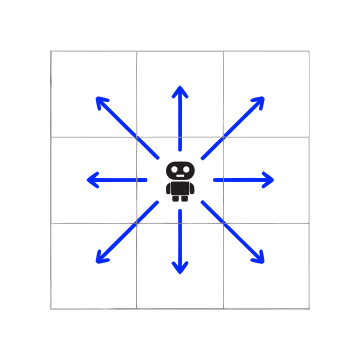
Any number of robots — of the same or different teams — may occupy the same cell. Robots are not obstacles to one another.
When a robot's health drops to
0, it is destroyed and removed from the field. If it was carrying a crystal, that crystal disappears.
Crystals
Crystals are the in-game currency used to build robots. A crystal field cell holds a limited number of crystals.
- When a robot not already carrying a crystal is on a crystal field cell during the crystal-collection step, it picks up one crystal on that tick.
- If more empty-handed robots are on a cell than there are crystals available, the crystals are distributed at random among those robots (one each) until the cell is exhausted.
- When all crystals in a cell have been collected, the cell becomes a normal empty cell and never refills during the game.
- A robot carrying a crystal delivers it automatically when it is on its own base cell; the crystal is added to the team's
crystals_balance.
The crystals_balance is an internal currency spent on building robots. It is reset to 0 at the start of every game and does not carry over between games. Collecting and delivering crystals does not, by itself, award points.
Available Actions
A strategy controls its robots through three independent action commands. Every command carries a tick field that must equal the last game tick, otherwise the command is rejected.
| Action | Method | Effect |
|---|---|---|
| Move robots | SetMoveAction |
For each listed robot, move it by a direction (dx, dy) with dx, dy ∈ {-1, 0, 1} (not both 0) into a non-wall cell. |
| Fire | SetRobotFireAction |
For each listed robot, fire at a target cell (see Combat). |
| Build a robot | SetConstructRobotAction |
If value is true, attempt to build one new robot on the base this tick (see Robot Production). |
Notes:
- Each command replaces the previously buffered command of the same type. The move command lists per-robot directions, the fire command lists per-robot targets, and the build command is a single boolean — so at most one robot is built per tick.
- An action targeting a robot that does not exist, is not alive, or (for firing) is on cooldown is rejected at submission time.
Combat
A robot may fire at a target cell when its fire_cooldown is 0. A target cell is valid only if it is not the robot's own cell and is within firing range: the Euclidean distance between the robot and the target does not exceed max_fire_distance (i.e. (Δx)² + (Δy)² must not exceed the square of max_fire_distance), and the straight path to the target is not blocked by a wall. A wall is a valid target — firing at a wall damages it (see below).
Walls block a shot only when they stand on the straight path between the robot and the target; walls elsewhere on the field don't matter:
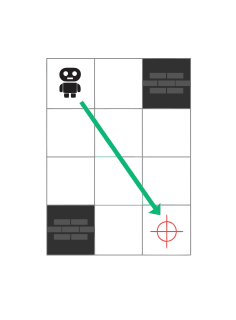
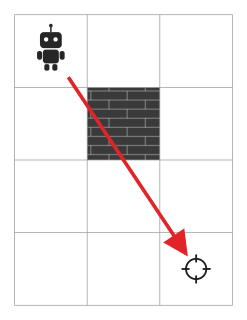
Note that the path is traced through the grid cells the line of fire crosses, so a wall can block a shot even when the geometric line only clips its corner — here the wall above the target cell blocks the shot from (0, 0) to (3, 2):
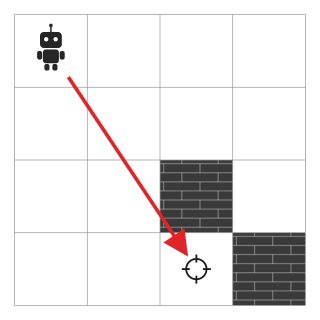
Conversely, merely touching wall cells does not block a shot. Here the line of fire from (0, 0) to (3, 3) passes exactly through the corner where two walls meet, without crossing either of them — the shot is clear:
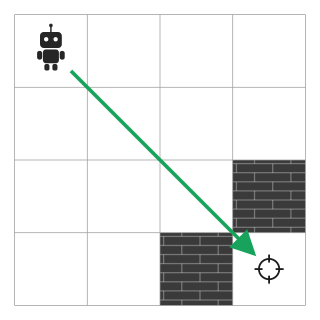
After a robot fires, its fire_cooldown counter is set to the configured fire_cooldown value and decreases by 1 at the end of every tick (down to 0). The robot may fire again once the counter is back to 0. Thus, a robot can fire once every fire_cooldown ticks: a robot that fires on tick T may fire again on tick T + fire_cooldown.
When shots resolve, the effect on each targeted cell depends on its contents. Let M be the number of shots that struck a given cell this tick:
- Robots. Every robot standing in the cell loses one health point for each of the
Mshots. A robot reduced to0health is destroyed. - Walls. A wall in the cell loses one health point for each of the
Mshots. When its counter reaches0, the wall is destroyed and the wall layer is removed; if the same cell has remaining crystals, it becomes a crystal field, otherwise it becomes empty. - Base. A base on the cell loses one health point for each of the
Mshots and is destroyed when it reaches0.
A shot applies to all objects in its target cell. For example, if a target cell contains a wall, robots, and a base, all of them are damaged by the shots that struck that cell.
A team may damage its own robots or base with its own fire, but earns no points for hitting its own objects.
Robot Production
Before a tick, a strategy may request building a new robot via SetConstructRobotAction(value = true). The server validates the request when it is submitted, using the team's current state at that moment. On that tick a new robot is created if:
- the team's base is still alive (its
health_pointscounter is above0), - the team's
crystals_balanceis at leastconstruct_robot_price, and - the team currently has fewer than
max_team_robotsrobots.
If the request succeeds, construct_robot_price crystals are deducted from the balance and a fresh robot (with initial_robot_health health, full readiness to fire) appears on the base cell, becoming controllable from the next tick.
Crystals being delivered on the current tick cannot be used for constructing a robot on that tick.
Team Elimination and Game End
A team remains active (status active) while its base is still alive or it has at least one living robot. A team whose base has been destroyed and that has no living robots is eliminated (status eliminated) and takes no further part in the game.
A game ends when either:
game_duration_ticksticks have elapsed, or- no participating team is still alive, meaning no participating team is still
active.
Applying Team Actions to the Game Field
On each tick the buffered actions of all teams are applied in the following fixed order. Within each step, the actions of all teams are applied simultaneously.
- Firing — all shots fired this tick resolve against robots, walls, and bases (combat is resolved using positions from the start of the tick, i.e. before movement).
- Movement — robots move according to their move actions.
- Crystal collection — empty-handed robots that are on crystal cells pick up crystals.
- Crystal delivery — robots carrying crystals that are on their own base deliver them to
crystals_balance. - Robot production — requested robots are built on bases.
Objects destroyed during a step do not take part in later steps of the same tick. In particular, robots destroyed during firing do not move, collect, or deliver later on that tick, and a base destroyed during firing cannot accept crystal deliveries or produce robots later on that tick.
Available Information
Throughout a game, every team can see the current field state (wall health and per-cell crystal amounts), the positions and health of all robots, the health and position of every base, all teams' crystals_balance, and all teams' scores. Teams cannot see other teams' pending (not-yet-applied) actions.
Every GameState contains the current game status: not_started, running, or finished. This is the authoritative way to discover whether the server is in a pause or an active game. Listen() continues streaming game states during pauses; there is no separate exact start-time endpoint, so strategies should watch for the transition to running and use EnterGame() to join the next game that has not started yet.
Every GameState also reports what combat produced on the previous tick:
fires_on_last_tick— every shot fired last tick, each with itsfromandtocells;destroyed_walls_on_last_tick— the cells of walls destroyed last tick;destroyed_robots_on_last_tick— the robots destroyed last tick, each with its cell and theidof the team that owned it;destroyed_bases_on_last_tick— the bases destroyed last tick, each with its cell and theidof the team that owned it.
These fields are reset every tick and describe only the most recent one.
Scoring
During a game, points are awarded for the following combat events. Hit points are awarded per shot. If several teams' shots destroy the same robot, base, or wall on the same tick, destruction points are awarded once to each unique attacking team whose shot hit that target. A destroying shot also earns the corresponding hit points. Overkill shots that hit the target on the destruction tick still count for hit scoring and destruction attribution. Teams never earn points for damage to their own robots or base.
| Event | Points |
|---|---|
| A shot damages an enemy robot | hit_robot_points |
| A shot destroys an enemy robot | destroy_robot_points |
| A shot damages an enemy base | hit_base_points |
| A shot destroys an enemy base | destroy_base_points |
| A shot damages a wall | hit_wall_points |
| A shot destroys a wall | destroy_wall_points |
For robots and bases, shots from the target's owning team reduce health but do not award that team hit or destruction points for its own object. For walls, every shot that hits the wall earns hit_wall_points, and every unique team that hit a wall destroyed on that tick earns destroy_wall_points.
The point values above are not fixed for the whole contest: every hour, starting from the beginning of the contest, all of them are increased by 10% (multiplied by 1.1, compounding). The active point values are always integers: each hourly value is rounded from the initial value multiplied by the appropriate hourly multiplier. Within a single game the values never change — each game uses the values in force when it starts, and the hourly increase takes effect between games. Points already earned are never recalculated. Query GetGameConfig() (or GET /v1/config) for the values currently in force.
The points earned in a game are added to the team's total points, which carries over between games. Each team's current_game_score shows the points earned in the running game, while total_score is the cumulative value.
Your problem score is proportional to your points divided by the best result among all teams:
Scores are synchronized with the competition scoreboard after the end of each game.
Game Configuration
GameConfig may change during the pauses between games. The variables below control a game. The authoritative current values of the full GameConfig — all of the parameters in the table below — are available through the GetGameConfig() method (and the HTTP GET /v1/config endpoint).
The values below are illustrative initial values and are subject to change; the organizers will publish the values in force.
| Variable | Meaning | Initial value |
|---|---|---|
game_duration_ticks |
Number of ticks in a game | 600 |
tick_interval |
Real time between ticks | 0.5s |
initial_number_of_robots |
Robots a team starts a game with | 3 |
initial_robot_health |
Starting health of each robot | 3 |
initial_base_health |
Starting health of a base | 10 |
max_team_robots |
Maximum number of robots a team may have at once | 20 |
construct_robot_price |
Crystals required to build one robot | 5 |
max_fire_distance |
Maximum Euclidean firing range | 5 |
fire_cooldown |
Cooldown set on a robot after it fires | 3 |
hit_robot_points |
Points for a shot damaging an enemy robot | 10 |
destroy_robot_points |
Points for a shot destroying an enemy robot | 50 |
hit_base_points |
Points for a shot damaging an enemy base | 20 |
destroy_base_points |
Points for a shot destroying an enemy base | 200 |
hit_wall_points |
Points for a shot damaging a wall | 2 |
destroy_wall_points |
Points for a shot destroying a wall | 5 |
Visualizer
A web visualizer for watching games is available at fast-ferrous-ui.midnightcodecup.org.
The visualizer is provided for convenience and may receive visual changes and improvements during the contest.
Authentication
Requests that act on behalf of your team must include your checksystem API token:
Authorization: Bearer <your-api-token>
Note that the gRPC and HTTP handles perform authentication differently — see the GRPC API and HTTP API sections for the transport-specific details.
GRPC API
The game server is available at grpc://fast-ferrous.midnightcodecup.org:443 (over TLS). Read the protocol definitions (download the .proto files) to learn the available commands and message types. The public methods are listed in the table below, together with their HTTP counterparts.
Once a team has entered a game it remains registered in that game even if its connection drops; a strategy may reconnect and continue controlling the team.
Pass your API token (see Authentication) via the "authorization" key in the metadata of every request — the bare token, without the Bearer prefix used by the HTTP API.
Each team is limited to 10 requests per second and to no more than 3 simultaneous Listen() subscriptions.
HTTP API
In addition to gRPC, the server exposes an HTTP/JSON API under /v1 with counterparts for the public gRPC methods. Every request must carry the team token in the Authorization: Bearer <your-api-token> header (the HTTP equivalent of the gRPC authorization metadata); unknown tokens get 401 Unauthorized. The same 10 requests/second rate limit and 3 simultaneous subscriptions limit apply.
| Method & path | gRPC equivalent | Comments |
|---|---|---|
GET /v1/listen |
Listen |
Streams GameState updates during running games and pauses. |
POST /v1/actions/enter |
EnterGame |
Idempotently registers the team for the next game that has not started yet; during a running game, the request will be rejected. |
POST /v1/actions/move |
SetMoveAction |
For the same tick, each successful call replaces the previous move command. |
POST /v1/actions/fire |
SetRobotFireAction |
For the same tick, each successful call replaces the previous fire command. |
POST /v1/actions/construct |
SetConstructRobotAction |
For the same tick, each successful call replaces the previous robot-construction command. |
GET /v1/config |
GetGameConfig |
Returns the current configuration and point values. |
GET /v1/state |
GetGameState |
Returns the latest known GameState, including the current status. |
GET /v1/self |
GetSelf |
Returns the authenticated team's current public state. |
Domain errors map to HTTP statuses: an invalid or late action returns 400 Bad Request, an unknown team returns 404 Not Found, and exceeding the subscription limit returns 429 Too Many Requests.
Streaming (GET /v1/listen)
GET /v1/listen is the HTTP counterpart of the gRPC Listen stream. The server responds with Content-Type: text/event-stream and keeps the connection open, writing one JSON-encoded GameState per game tick as a server-sent-events chunk. This handle implements the Server-Sent Events (SSE) protocol: every game state is sent as a data: <GameState JSON> event frame followed by a blank line. The stream continues until the client disconnects. As with gRPC, each open stream counts against the 3 simultaneous subscriptions limit.